SPARCRequest Wiki
SPARCRequest v2.0.0+SPARCFulfillment v2.4.5
- Melissa Fludd (Unlicensed)
SPARCRequest Version 2.0.0 New Features
Release Date: March 15, 2017
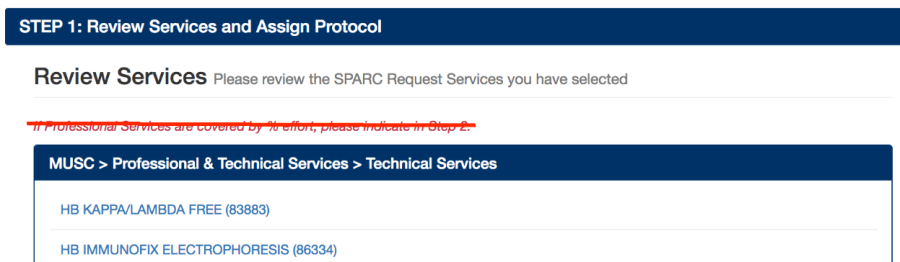
1.(SPARCRequest) Step 1: Obsolete Language Removed
The language on Step 1 page that stated "If Professional Fees are covered by % effort, please indicate in Step 2" has been removed to avoid confusion.
2. (SPARCRequest) Step 1 and Step 2: Tooltips Hover-Over Added
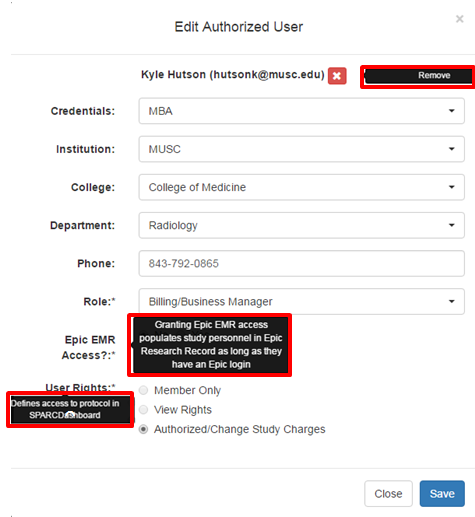
Tooltips have been added to SPARCRequest Step 1 and Step 2 pages to help define the meaning of each field, or function of buttons. For example, when user(s) hover over the fields, such as "Short Title" and "Funding Source" on the Step 1 Study Information section, corresponding definition now appears.
Step 1 (Study Information & Authorized Users) 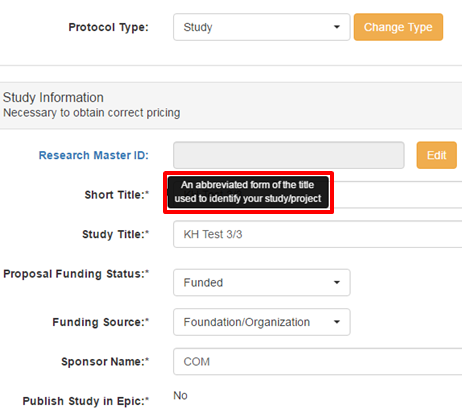
Step 2A 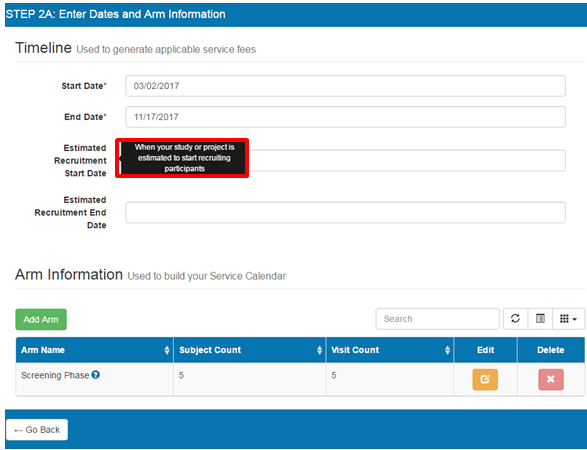
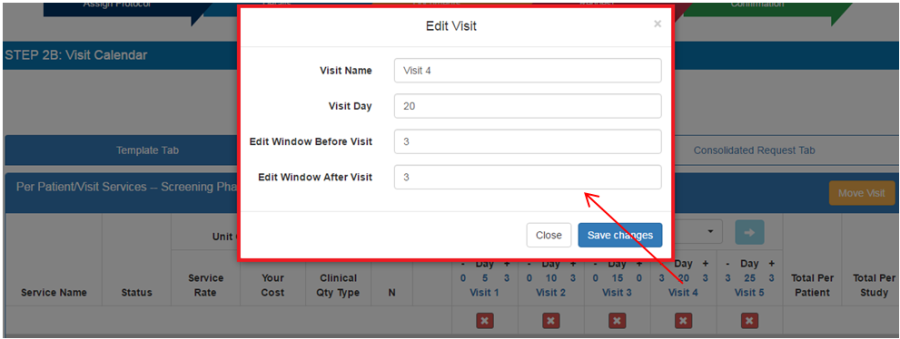
3. (SPARCRequest) Step 2B: Combine Edit Visit Window on the Calendar
When editing visit information on the Step 2B (Visit Calendar) page, the popup "Edit Visit" window has now been combined into one window that includes "Visit Name", "Visit Day", "Window Before Visit."
4. (SPARCRequest) Step 2B: Logic-driven Notation Labels
The following changes have been made with the labels on SPARCRequest Step 2B page to make the notifications clearer:
1). The "PT" on the second line has been deleted;
2). The 3-line content(s) now only shows when the "Quantity/Billing" tab is chosen.

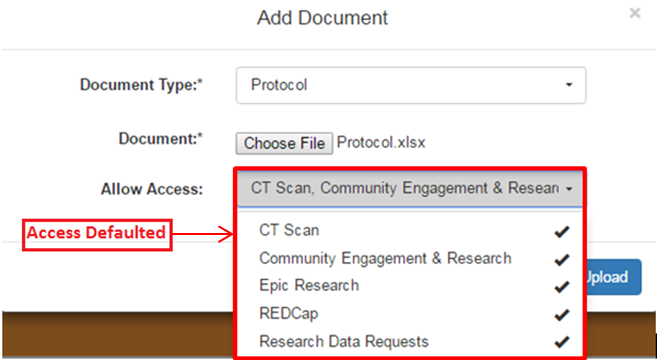
5. (SPARCRequest) Step 3: Default Document Access to Every Service Provider
On SPARCRequest Step 3, when adding a new document, the "Allow Access" dropdown is now defaulted to give every service provider on the protocol access. This functionality now behaves consistently between SPARCRequest and SPARCDashboard.
6. (SPARCRequest & SPARCDashboard) "Edit" Button and Status Bug Fix
A bug has been fixed that occurred when using the "Edit" button(s) on SPARCDashboard to edit an individual request and continuing by clicking one of the buttons on SPARCRequest Step 4 page. The previous bug was changing status on all requests in the chosen protocol. Now "Edit" only affects the status of a single request.
SPARCDashboard 
SPARCRequest (Step 4)

7. (SPARCRequest) Step 4: Protocol Notes Display Bug Fixed
On SPARCRequest, the added protocol notes on Step 3 are now showing up on the Step 4 (summary) page. Previously this was not showing although the notes were being stored correctly and showing up on SPARCDashboard.
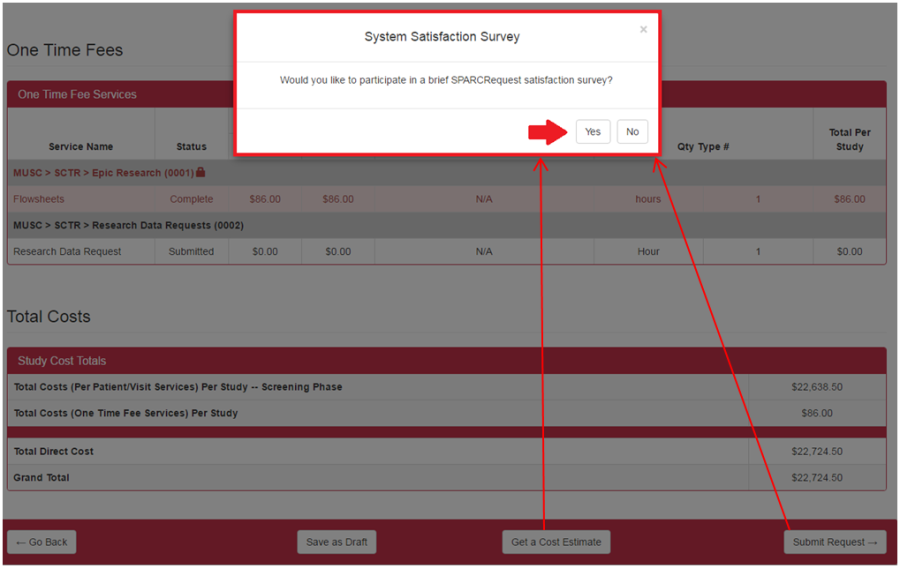
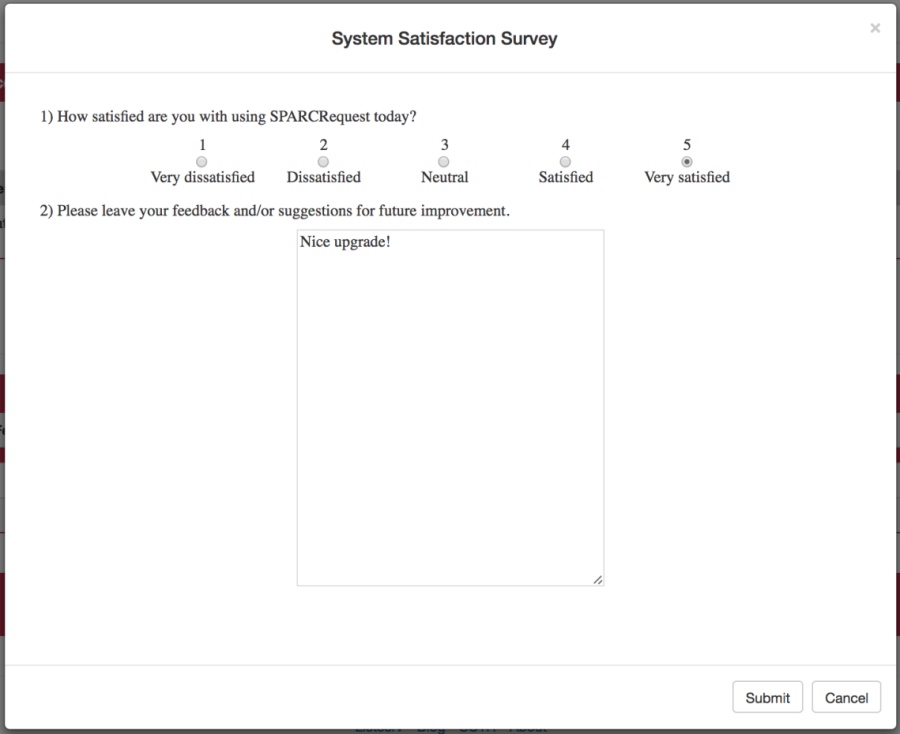
8. (SPARCRequest) Step 4: System Satisfaction Survey Updated (Version 1)
The SPARC System Satisfaction Survey triggered when clicking "Get a Cost Estimate" or the "Submit Request" button on SPARCRequest Step 4 page, has been updated to a 1-5 Likert scale survey.
9. (SPARCRequest) Updated SCTR Customer Satisfaction Survey (Version 1)
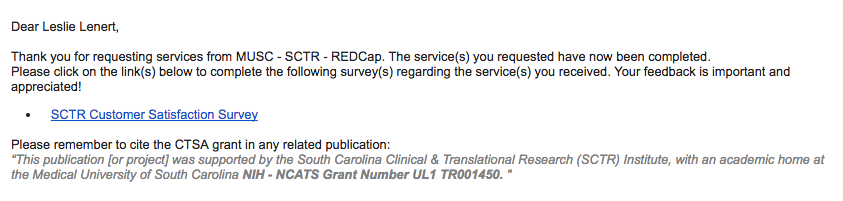
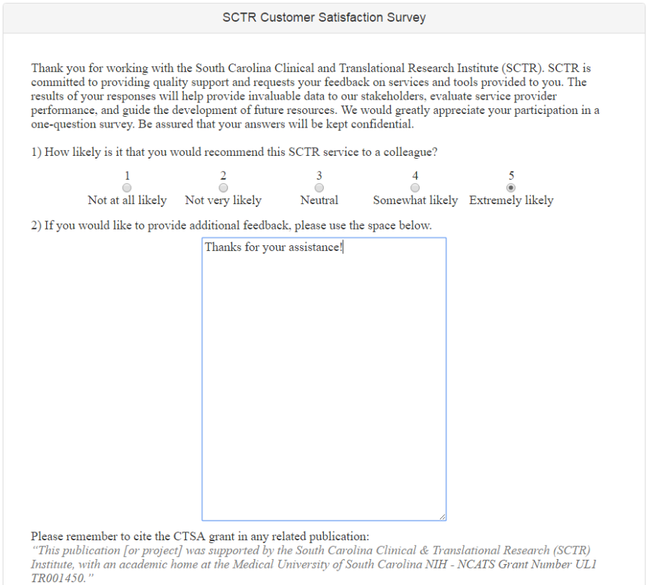
The SCTR Customer Satisfaction Survey, which is sent via email to users upon completion of a SCTR request (by service providers), has been updated to a 1-5 Likert scale survey for better metric tracking. Also, in the email that is sent to users (with the link to the survey), there is now a paragraph for publication citation.
10. (SPARCRequest) Gemfiles Security Check
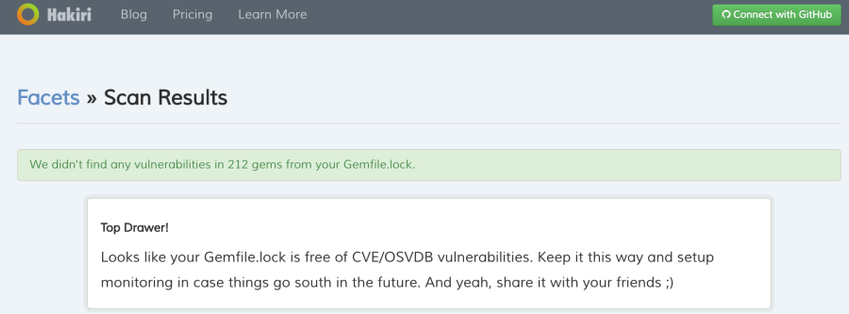
SPARCRequest gem files security check has been completed with Hakiri Facets. No updates were needed at this time.
11. (SPARCRequest) Service Request Notes Replacement in Emails (LA CaTS contribution)
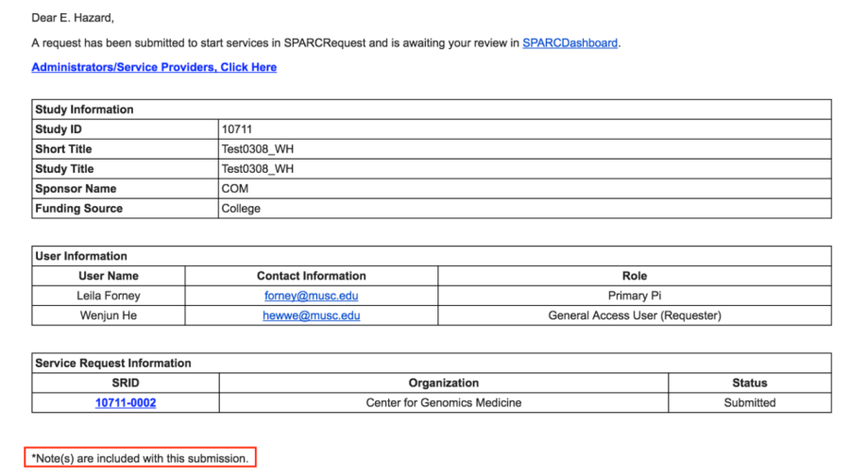
The emails sent to service providers, that related to protocols with notes attached, are now referring to "protocol note(s)" instead of the previous "service request note(s)." This was done to ensure the note-related language in the email is triggered correctly.
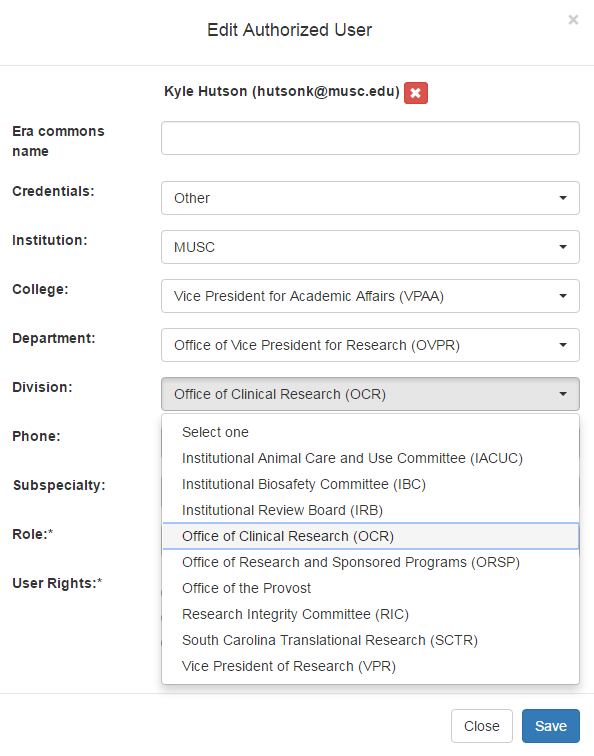
12. (SPARCRequest & SPARCDashboard) College/Department/Division List Update
The College/Department/Division list in SPARCRequest has been updated to include the Office of Vice President for Research (OVPR) and Dean's Office.
13. (SPARCRequest & SPARCDashboard) Edit Request Bug with Navigation Step Links Fixed
A previous bug occurred when clicking "Edit" on a request on SPARCDashboard, where only the SSR being edited was shown in the shopping cart. Then, when clicking one of the navigation arrows (on top of the SPARCRequest page), all of the SSRs were showing up in the cart, instead of the selected one. This bug has been corrected.
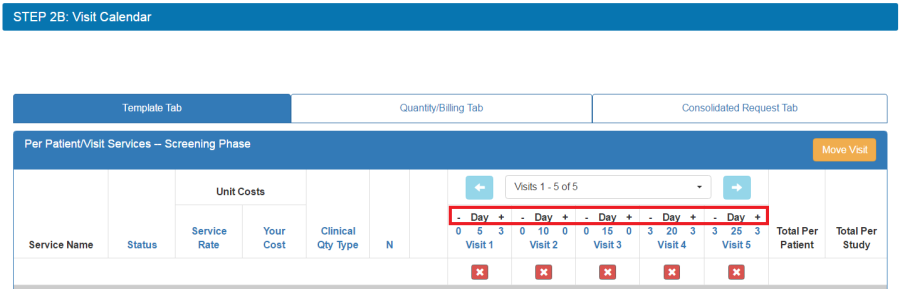
14. (SPARCRequest & SPARCDashboard) Visit Window -/+ Sign Display Correction
On SPARCRequest Step 2B and SPARCDashboard study calendar (all 3 tabs), the - and + sign(s) for the visit window(s) were displayed backwards. This has been corrected.
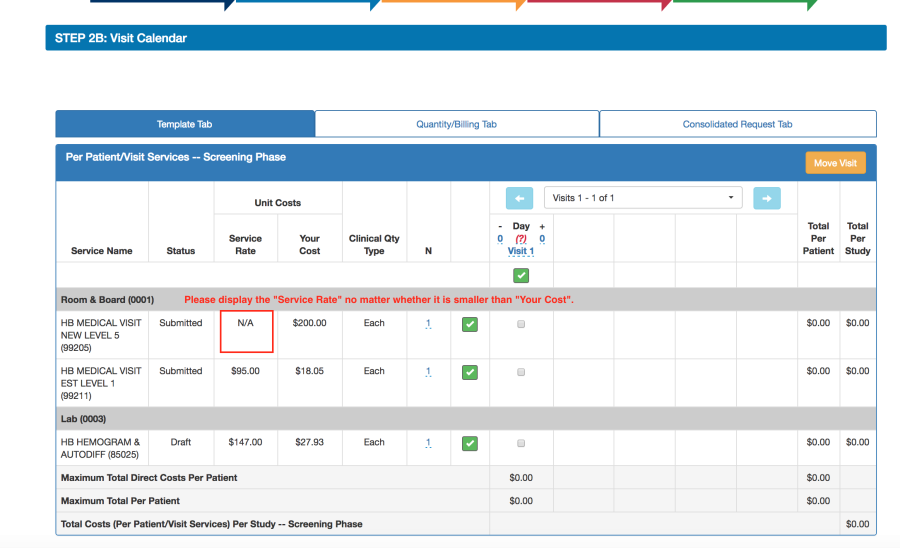
15. (SPARCRequest & SPARCDashboard) Price-Hiding Logic Deleted
On SPARCRequest and SPARCDashboard, the "Service Rate" is now displayed all the time, no matter whether "Your Cost" is higher than "Service Rate" or not for the chosen service. Previously, there was logic hiding the "Service Rate" when it is lower than "Your Cost" (see below).
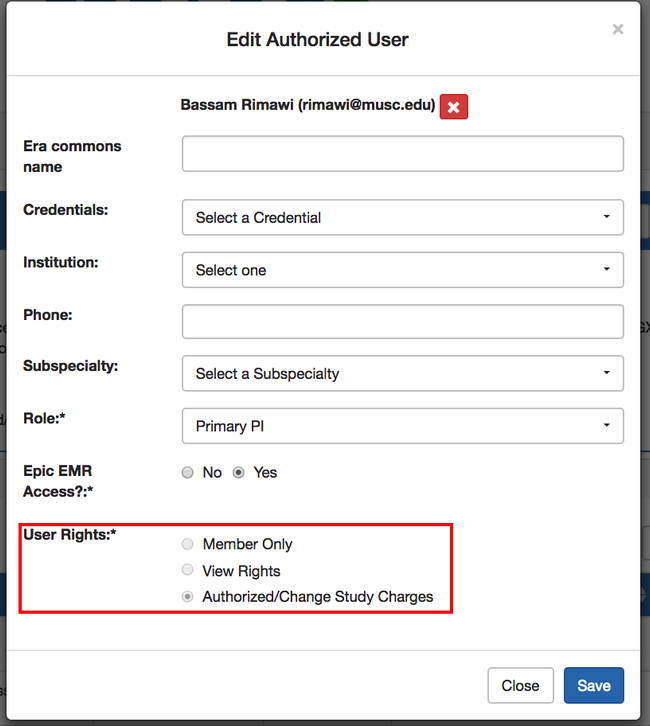
16. (SPARCRequest & SPARCDashboard) Remove the Request/Approve Services User Right and Migrate Historical Data
On SPARCRequest Step 1 page and the SPARCDashboard Authorized Users table, the "Request/Approve Services" user right has been removed. This right was removed because it did not trigger any functioning difference from the "Authorized/Change Study Charges" user right.
For historical data, the users with the "Request/Approve Service" (project_roles.project_rights = request) were migrated to have the higher right "Authorized/Change Study Charges" instead (project_roles.project_rights = approve).
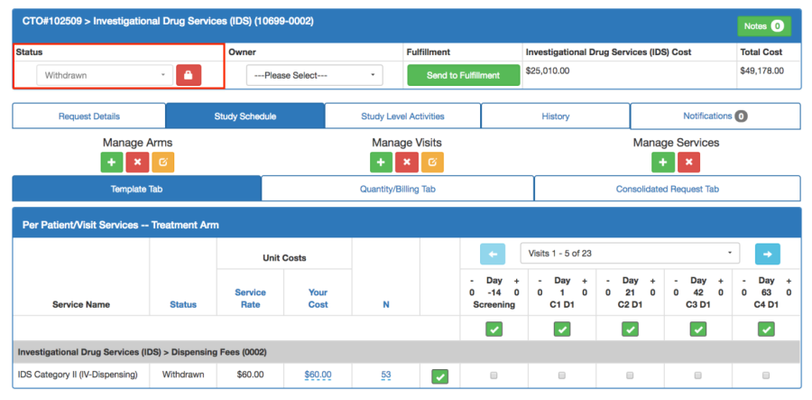
17. (SPARCRequest & SPARCDashboard) Withdrawn Status Reconfigurations
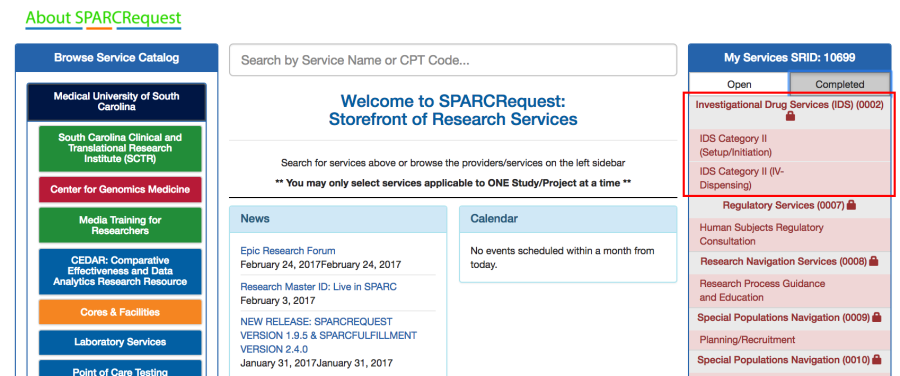
On SPARCRequest and SPARCDashboard, the "Withdrawn" status now behaves the same way as the "Complete" status. The following applies:
1). Request status cannot be changed after a service provider changes it to "Withdrawn"
2). The request shows up in the "Complete" tab in SPARCRequest shopping cart and cannot be edited.
*These types of statuses are now defined as "finished_statuses" and can be configured in "applications.yml."
18. (SPARCRequest & SPARCDashboard) Display Research Master ID in "Study Details" and "Study Summary"
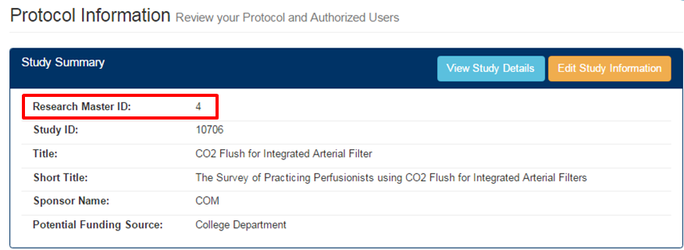
On both SPARCRequest Step 1 and SPARCDashboard, the "Research Master ID" field has been added in the "View Study/Project Details" window, as well as in the "Study Summary" section, for easier access. This new feature is linked with the RMID configurations in application.yml.

19. (SPARCRequest & SPARCDashboard) Fix OTF Service associations
There were some historical arms that had one-time-fee line items associated with them, when only per-patient-per-visit line items should be associated with an arm. This was causing issues for front-end users not being able to move forward from the Step 2B Study Calendar page.
We have improved the validation on the calendar page and the methods to prevent the wrong associations and also included a rake task (fix_otf_service_associations.rake) for cleaning up the wrong association.
20. (SPARCRequest & SPARCDashboard) Duplicated Past Statuses Bug Fix
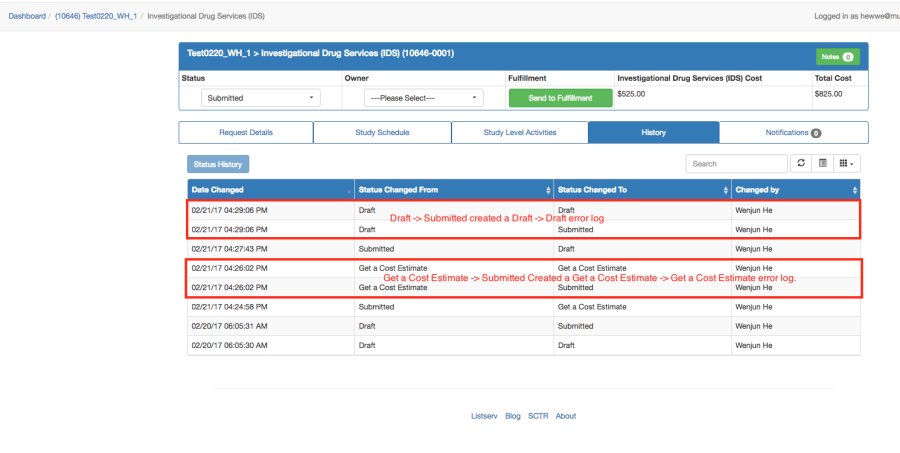
When an authorized user changes the status on SPARCRequest by clicking one of the buttons on the Step 4 page (Save as Draft, Get Cost Estimate, or Submit Request), there are some scenarios in which the system was creating duplicated statuses (in past_statuses table in the database).
For example, when changing from Get a Cost Estimate to Submitted, the system was creating a Get a Cost Estimate to Get a Cost Estimate wrong entry; when changing from Draft to Submitted, it was creating a Draft to Draft wrong entry with the same time stamp (see previous screenshot below).
In this new release, we have:
1). Fixed the bug on SPARCRequest Step 4 page that was causing the creation of duplicated statuses
2). Created a rake task (remove_duplicate_past_status.rake) to remove previous wrongly generated past_statuses based on the audit trail and time stamps
3). The logic on the "Historical Status Table" in SPARCDashboard "Admin Edit" section has been improved to use the past_status.date instead of past_status.created_at.
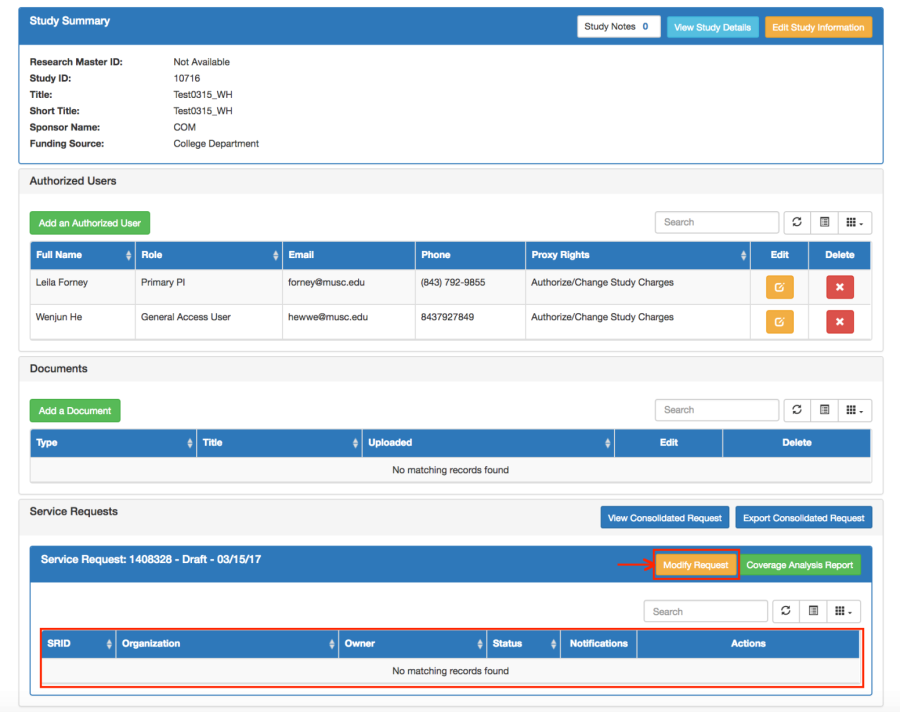
21. (SPARCDashboard) Add Services Button Removal
The previous "Add Services" button on SPARCDashboard has been removed. The structure has been changed to when a new protocol is created from SPARCDashboard, the corresponding service request is created, too. Now, authorized users can use "Modify Request" button to add services to an empty protocol (study/project).
Also, a new script (add_service_request_to_dashboard_protocols.rake) is included with this release to fix the historical empty protocols (without service requests).
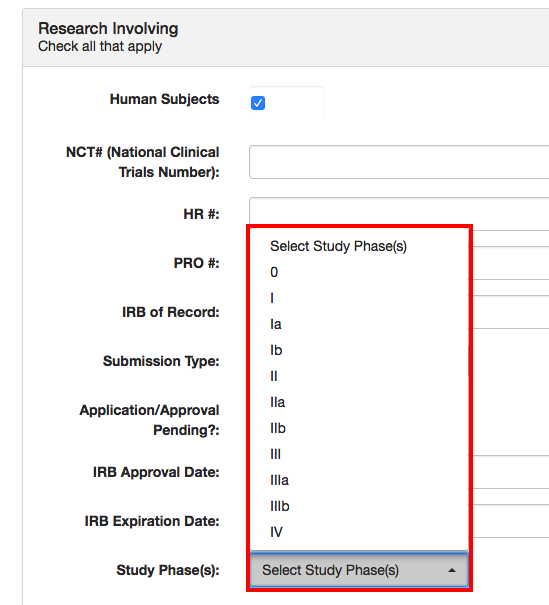
22. (SPARCRequest & SPARCDashboard and Database) Study Phases Reconfiguration
For the "Study Phase" option in "Research Involving" section of Study Information when "Human Subjects" is checked, the following reconfigurations have been made:
1). The list of clinical trial phases has bene updated to be more inclusive (0, I, Ia, Ib, II, IIa, IIb, III, IIIa, IIIb, IV)
2). The study phases dropdown is made multi-selection now
3). "Study_phases" setup has been extracted out of the constants.yml file into the database (study_phases table) for future conversion of making settings accessible to users
4). Study phase data (Phase I, II, III, IV) on existing protocols has been migrated to adjust accordingly.
23. (SPARCDashboard & SPARCRequest) Edit Request Missing Email Paragraphs Bug Fix
On SPARCDashboard, when clicking the "Edit" button on a chosen request, proceeding to go through the steps in SPARCRequest to either "Get a Cost Estimate" or "Submit Request" on Step 4, the emails sent out to authorized users and the service providers were missing some language (i.e., the user's name and the 1st paragraph of the email body were missing). This bug has been fixed.
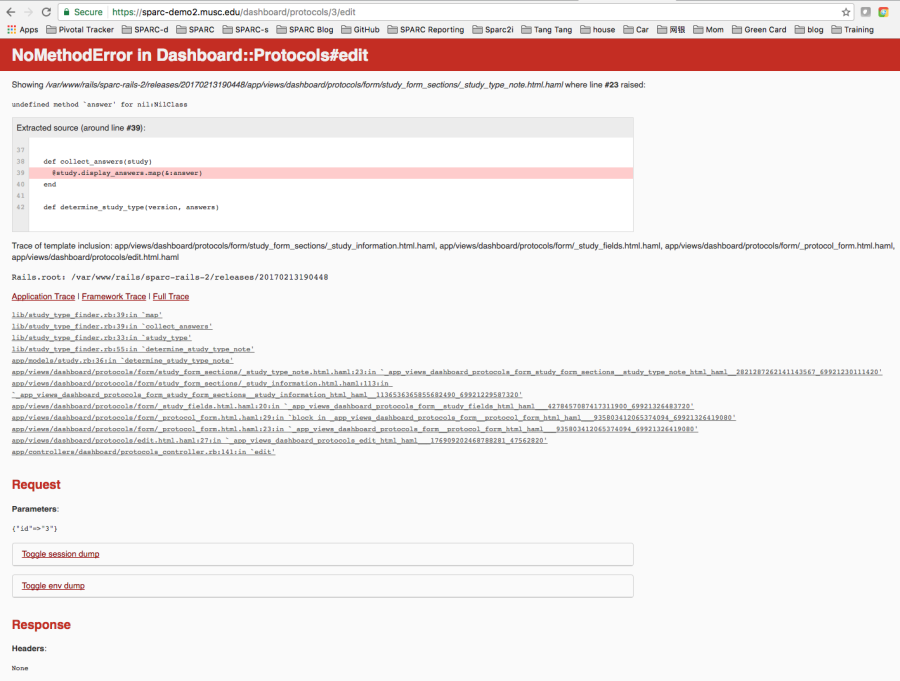
24. (SPARCRequest & SPARCDashboard) Edit Study Information Bug (When Epic is Turned Off) Fixed
When Epic-related functions are turned off (by turning off Epic configuration in application.yml), there was a bug causing "Edit Study" giving out an error message (see screenshot below) when clicked upon on a study that is selected to be "send to Epic". This bug has been fixed in this release.
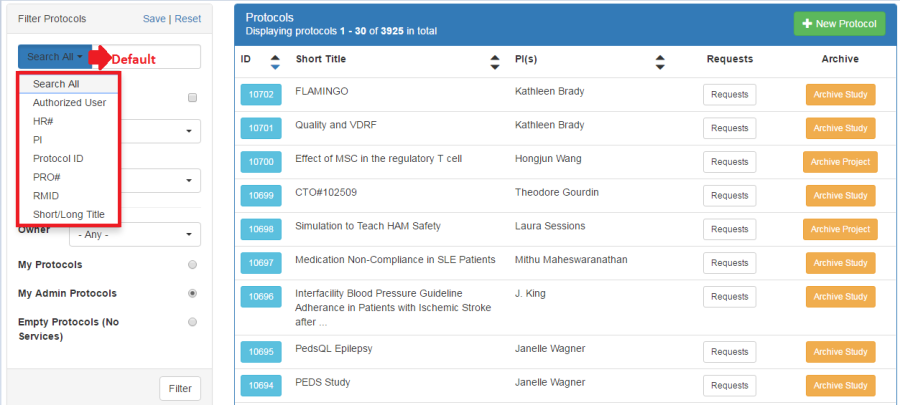
25. (SPARCDashboard) Search Functionality Improvement
On SPARCDashboard, the search function on the "Filter Protocols" left panel has been improved to allow searching a specified field (among Authorized User, HR#, PI Name, Protocol ID, PRO#, RMID, Short/Long Title), or searching all listed fields.
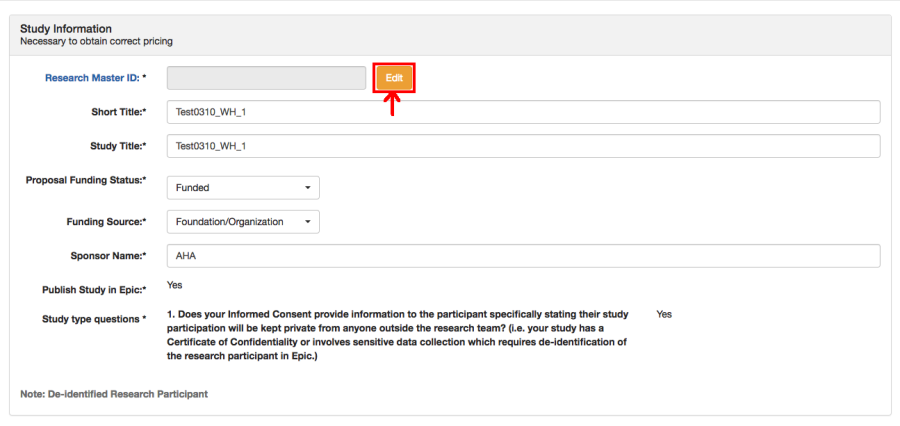
26. (SPARCDashboard) Admin User Bypassing RMID Validations
In order for a SPARC admin user (service provider or super user) to be able to edit and save other protocol level information without having to create a Research Master record, a new function has been built for admin users to be able to bypass the RMID validations.
On SPARCDashboard, when an admin user (service provider or super user) clicks "Edit Study Information",
1). The "Research Master ID" field is now view only
2). He or she can edit and save other protocol information without filling in the Research Master ID
3). If using a RMID is desired, the admin user can still click the "Edit" button next to the field to enter or revise the RMID.
27. (SPARCDashboard) Deleting Last Request Rerouting Bug Fixed
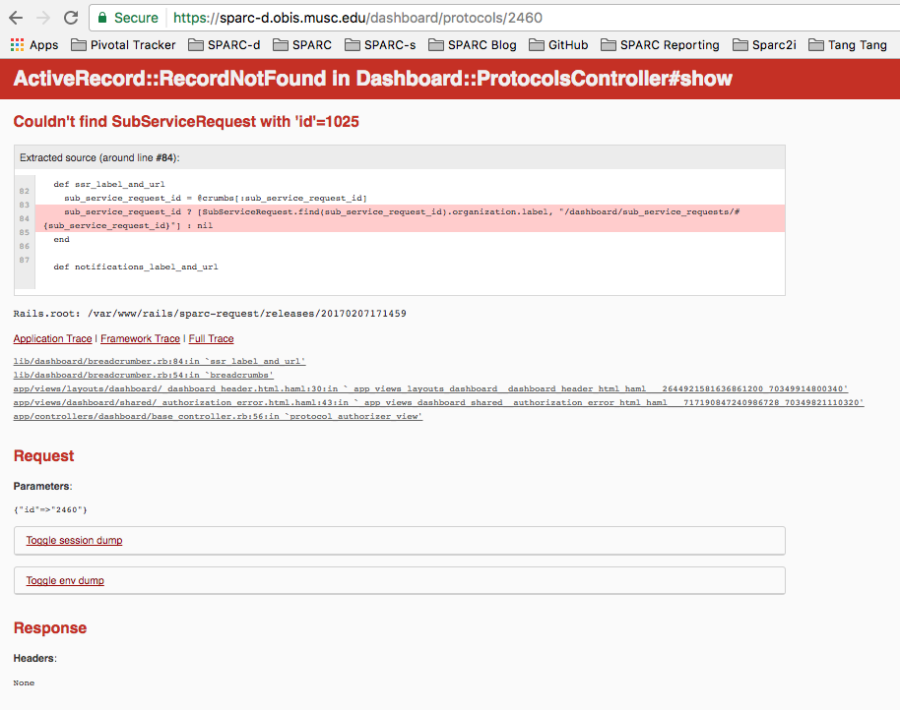
When an admin user is trying to delete the last request in SPARCDashboard by clicking the "Delete Request" button in "Admin Edit" section, there was a bug causing an error to appear (see screenshot below for an example). That issue was caused by a re-directing issue to SPARCDashboard homepage and has been fixed.
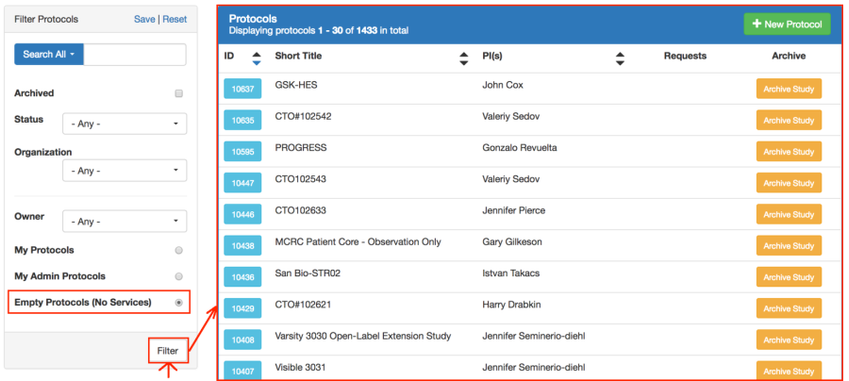
28. (SPARCDashboard) Empty Protocols Now Accessible for Super Users
When a protocol is empty (with no requests in it), there was no way for admin users to access them, or assist study teams. A new "Empty Protocols" filter has been added to the left panel on the SPARCDashboard homepage for super users. Now they can filter and see the empty protocols in the system.
29. (SPARCDashboard) View Request Calendar Bug Fixed
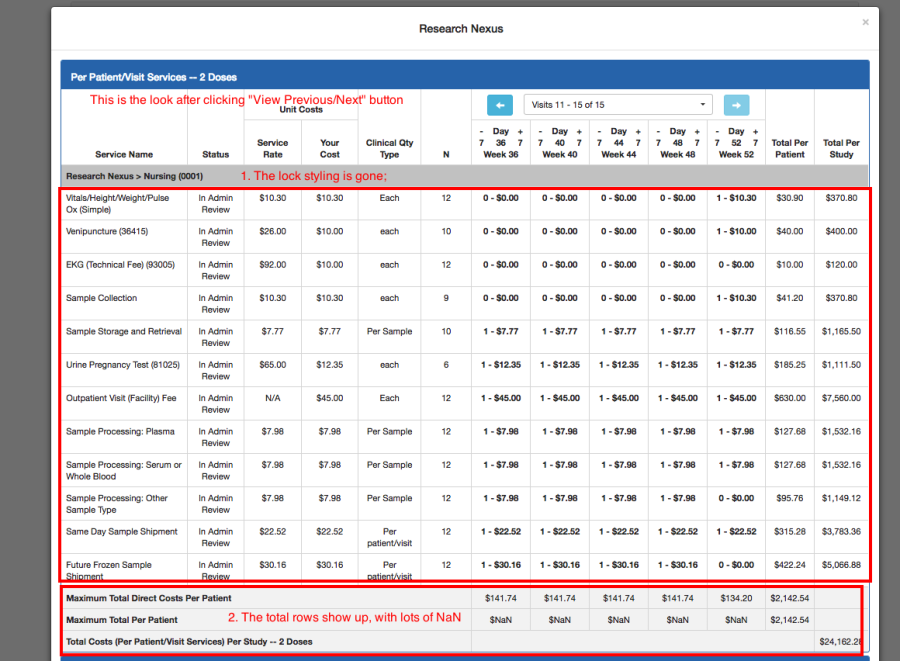
On SPARCDashboard, when clicking the "View" button on requests of a protocol that has more than 5 visits, the views were different after clicking "View Previous" or "View Next" (see screenshot below as an example).
In this release, the following has been fixed:
1). Total rows no longer show "NaN"s
2). If that request is locked, after clicking "View Previous/Next", the styling is now consistent.
30. (GitHub) Update Documentation: CUSTOMIZE.md
The information in the CUSTOMIZE.md file has been updated for new and existing Open Source partners.
31. (SPARCRequest-Database) Remove Contact_forms Table
The contact_forms table in the SPARCRequest database is not in use or referenced. It has been removed during this data migration and the related old codes were cleaned out.
32. (SPARCRequest-Database) Four Columns Removed from service_requests Table
There were four columns (subject_count, consult_arranged_date, pppv_complete_date, pppv_in_process_date) in the SPARCRequest service_requests table that were not referred to or being used by the system. These four columns have been removed by the data migration for this new release.
33. (SPARCRequest & SPARCDashboard) Script for Replacing Special Characters in Arm Name
The arms names with special characters (from historical data) were breaking the validations and causing the SPARCRequest/SPARCFulfillment API to fail. A rake task (replace_arm_name_special_characters.rake) has been created to delete the special characters (( [ ] * / \ ? : )) in arm names to prevent the future failures.
34. (SPARCCatalog) "Display in SPARC" Not Saving Bug Fixed
When creating a new service in SPARCCatalog and selecting the "Display in SPARC" checkbox, after the new service was saved successfully, the selected checkbox was not actually saved. This bug has been fixed.
35. (SPARCCatalog) Hospital Services Update Script Created
We have created a new script (update_hb_services.rake) for updating attributes (such as service name, CPT code, Revenue code, pricing, etc) routinely for hospital services during a Fiscal year. This script can be used to find the corresponding hospital service by it EAP ID, update its CPT code, revenue code, and service name if different, and/or create a new pricing map with the designated date if the pricing of the service has changed. The script also generates a report showing which services and fields were updated.
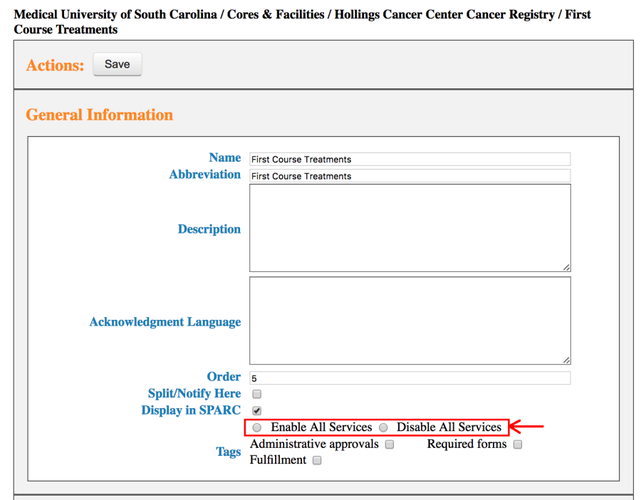
36. (SPARCCatalog) Enable/Disable All Services Function
In SPARCCatalog, a new feature has been added for catalog managers to "Enable All Services" or "Disable All Services" via radio button choices, when there is an active organization that has services directly underneath. This new feature was built to separate the ability to disable/enable all services function from the "Display in SPARC" checkbox. This was done so that changing an organization from inactive to active, the services in that organization were not affected.
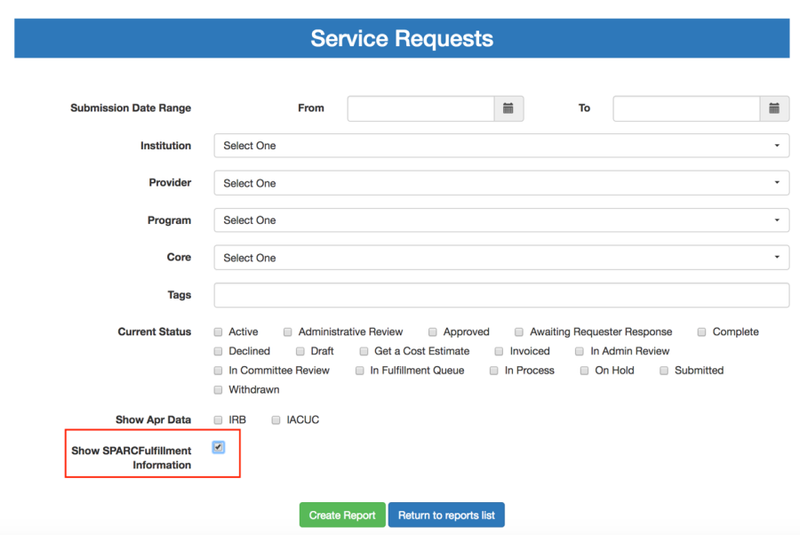
37. (SPARCReport) Service Request Report Adding Column
To give users easy access to whether a request has been pushed to SPARCFulfillment from SPARCRequest, minor reconfigurations have been done to the Service Request report.
1). A "Show SPARCFulfillment Information" checkbox has been added on the filter page where it defaults to un-selected.
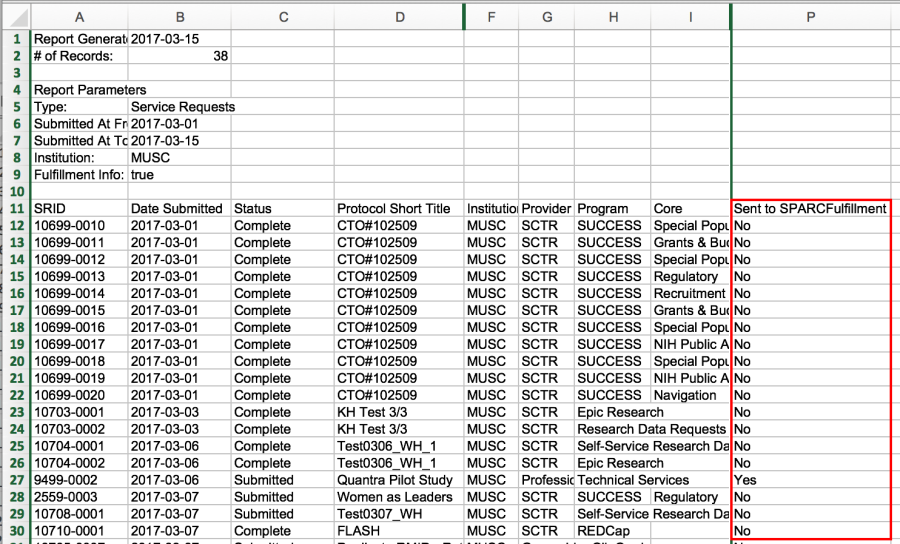
2). When user(s) have the "Show SPARCFulfillment Information" checkbox selected, a "Sent to SPARCFulfillment" column has been added to the generated report. This shows whether the corresponding SSR has been pushed to SPARCFulfillment, or not.
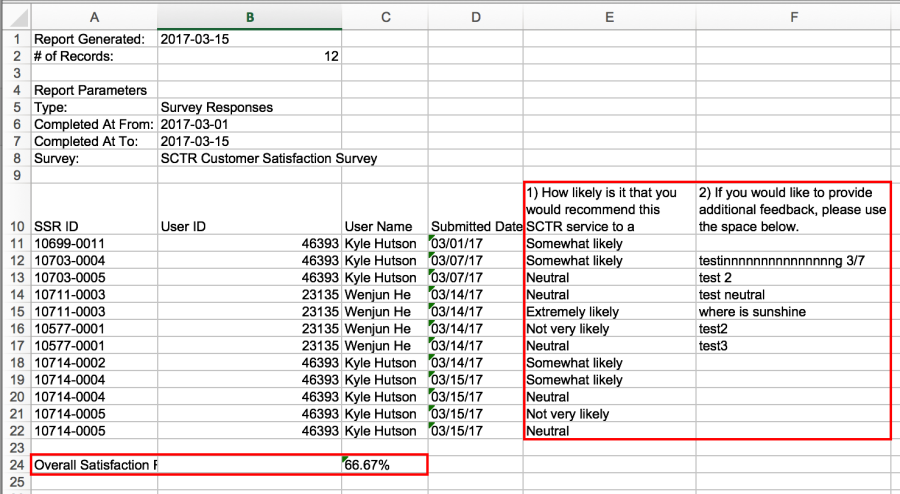
38. (SPARCReports) Survey Responses Report Reconfiguration
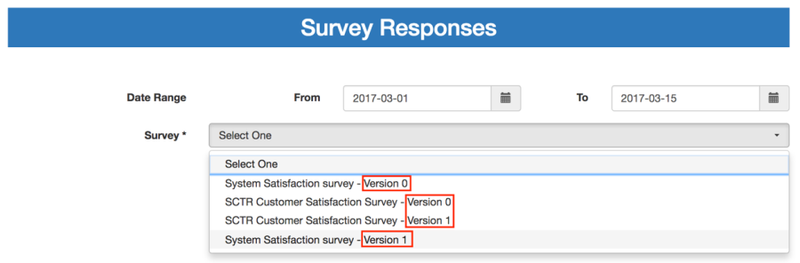
The following reconfigurations have been done for the Survey Reponses report:
1). Version of the surveys are now displayed in the "Survey" dropdown list for users to choose which version of the survey they need to run the report on
2). The satisfaction rate calculation formula has been revised for the version 1 of both surveys to count the new Likert percentage (1 = 20%, 2 = 40%, 3 = 60%, 4 = 80%, 5 = 100%).
SPARCFulfillment Version 2.4.5 New Features
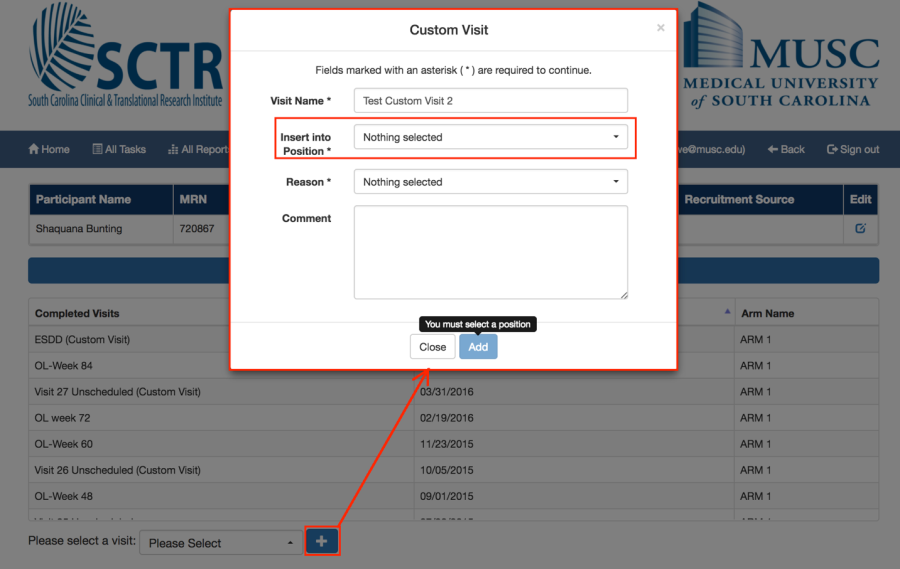
1.(SPARCFulfillment) Custom Visit Creation Validation
When adding a custom visit by clicking the "+" sign on SPARCFulfillment participant tracker, validations have now been added to the "Insert into Position" field. This was done so the user has to choose a position for the custom visit to be added.
2. (SPARCFulfillment-Database) Services Table Deleted
In the SPARCFulfillment database, the services table is empty and not being used. This table has subsequently been removed from the database.
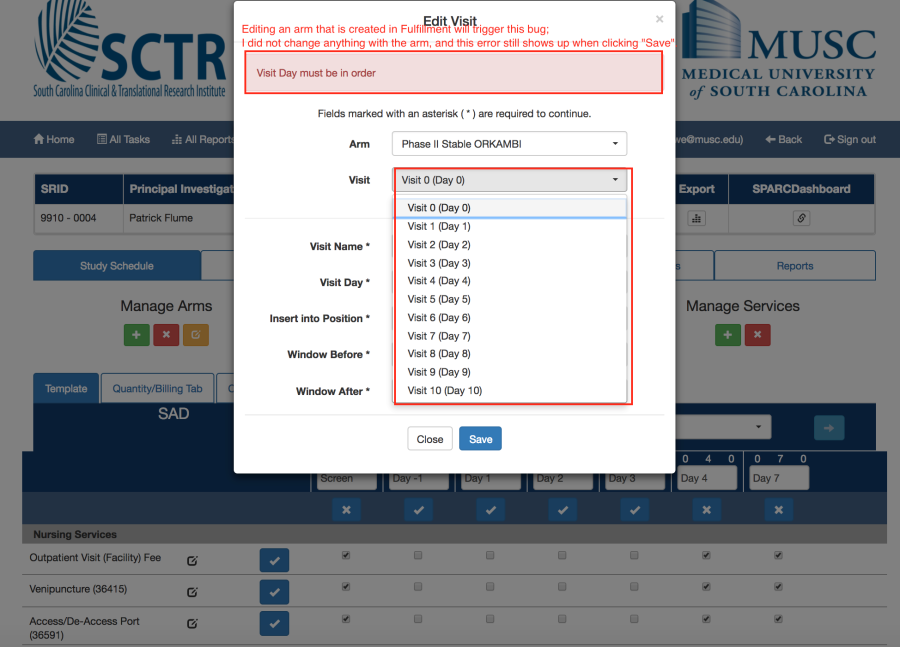
3. (SPARCFulfillment) Validation Bug Fixed for Custom Visit
When a user adds Arm(s) in SPARCFulfillment under the Study/Project Schedule tab that has multiple visits, and then tries to Edit the visit day or name (or other properties), an error message which states "Visit Day must be in order" appears, although the visit days are in order with the edits (see screenshot below). This bug has been fixed.
List of Programming Changes with Links to GitHub
SPARCRequest v2.0.0:
Remove Historical First Draft View commit
- Remove Calendar Totals Code View commit
- Visit Window +/- View commit
- Multiple Service Requests Bug, Dashboard Reconfiguration View commit
- Fixing Questionnaire Javascript View commit
- Removed JS Format Since no JS View View commit
- Rake Task That Adds New Orgs Under Correct Parents View commit
- Enabled Pro# & HR# Searching Capabilities for Protocols View commit
- Expanding Email Spec Coverage View commit
- Add Missing Tooltips View commit
- Display RMID – View Details View commit
- Form Functionality Validations View commit
- Additional Detail Specs View commit
- Identities With Null Email View commit
- Remove SSR Breadcrumb When It's Deleted View commit
- Fix Step Navigation Links During SSR Edit View commit
- SCTR/Customer Surveys v1 With Surveyor View commit
- Investigate Four Columns in SR Table View commit
- Step 4: Added Protocol Notes Not Showing Up View commit
- Fix OTF Service Associations View commit
- Move the Ruby Racer Gem to Production Group View commit
- Do Not Hide Prices View commit
- Step 3: Default Document Access to Every Service Provider View commit
- Move Research Medications Organization to MUHA Institution View commit
- Services Update Script View commit
- View SSR Calendar Bug View commit
- Display Orgs in Alphabetical Order View commit
- Display RMID – View Details View commit
- Remove the Request/Approve Services User Right and Migrate View commit
- (SPARCRequest & SPARCDashboard) Edit Study Information Bug When View commit
- Service Abling2 View commit
- Form Functionality Form Builder Part II View commit
- Finished Statuses View commit
- Add Missing Tooltips View commit
- Fix Contact Form Production Errors View commit
- Fixing Disabled Checkbox for New Service Form View commit
- Form Functionality Form Builder Part II View commit
- Remove Contact _Forms Table View commit
- Display Research Master ID in View commit
- Service Request Report Adding Column View commit
- Search Functionality Reconfiguration (Add Pro# & HR # into Search) View commit
- Hospital Service Import View commit
- In CM, If a Service threw an Error on Update View commit
- Refactor How We Show Fields View commit
- (SPARCRequest & SPARCDashboard) Study Phases Reconfiguration View commit
- Tooltips: Step 1 Study Information View commit
- Form Functionality Form Builder Part II View commit
- Service Request Report Adding Column View commit
- Tooltips: Step 1 Authorized Users View commit
- Fixing Another Refresh Issue View commit
- Tooltips: Step 2a View commit
- Remove Navigations Controller View commit
- Additional Details 500 Error View commit
- Merge Protocols View commit
- Step 2b: Combine Edit Visit Modals on the Calendar View commit
- Tooltips: Step 2b: Template Tab View commit
- (SPARC-Database) Script Needed to Replace Special Characters in Arm Name View commit
- Fixed Bug Causing Duplicate Past_Statuses. Rake That Fixes Past Statuses View commit
- Tooltips: Step 1 Study Information View commit
- Updating Task to Account for SSRS That Are in Fulfillment View commit
- Empty Protocol Admin View View commit
- Rake Task for Matching Up Identities to Professional Orgs Part of Migration View commit
- Edit Protocol RMID Changes View commit
- Survey Submit Button in Results Email Bug View commit
- Tooltips: Step 2a View commit
- Tooltips: Step 1 Study Information View commit
- Tooltips: Step 1 Authorized Users View commit
- SCTR Customer Satisfaction Survey Email Bug View commit
- Update Read Me View commit
- Edit SSR Missing Email Paragraphs Bug View commit
- Form Builder Value Bug View commit
- Get Cost Estimate Email Extra Blank/Line View commit
- Fix for Notes in Emails (LA CaTS Contribution) View commit
- Protocol Filter Spec Failure View commit
- Turning Off Sign_Up Devise Form Vased on Shibboleth Config. View commit
- Tooltips: Step 2b Template Tab View commit
- Empty Protocol Admin View View commit
- SCTR Customer Satisfaction Survey v1 View commit
- Survey Reports View commit
- Form Functionality Value Bug View commit
- Additional Survey Report Details View commit
SPARCFulfillment v2.4.5:
- Add New Custom Visit Validate on Save View commit
- Fixing Position Attribute – Was Indexing at 0, but Should be 1 View commit
Related content
Copyright © 2011-2020 MUSC Foundation for Research Development